10 symptoms you should not ignore
AN APPLE A DAY By TYRONE M. REYES, M.D. Updated March 17, 2009 12:00 AM
If you met an accident and were bleeding heavily, you probably wouldn’t think twice about seeking immediate medical care. The same goes if you suddenly doubled over with stomach pain or felt severe pressure or pain in your chest that wouldn’t go away. But what happens when you experience symptoms that don’t seem quite so alarming or are just a bit out of the ordinary?
While you don’t need to rush to the doctor with every unexplained muscle twinge or upset stomach, you also don’t want to ignore symptoms that could lead to early treatment before a condition becomes life-threatening. You’re going to have better outcomes if you seek early treatment. You can’t sit back and assume everything will get better on its own.
Read more at Philstar.com Health and Family
Tuesday, March 17, 2009

Wednesday, March 11, 2009
Earn 500 Bucks a Month
from http://www.earn500bucksamonth.blogspot.com/
This is one of the biggest secret I have to revealed about my freelance work. So get ready!
Earning 500 bucks through freelance work is as easy as 1-2-3. Yes, all you need to do is have the skill, have a client and do the work equals dollars!
Read more at this blog with another review at istorya.net
from http://www.earn500bucksamonth.blogspot.com/
This is one of the biggest secret I have to revealed about my freelance work. So get ready!
Earning 500 bucks through freelance work is as easy as 1-2-3. Yes, all you need to do is have the skill, have a client and do the work equals dollars!
Read more at this blog with another review at istorya.net
Monday, February 16, 2009
Romantic Ideas
from All Pro Dad
Call to see if you can pick up anything on the way home from work.
Send a dozen roses: 11 red roses and 1 white one. The note: "You're the only one for me."
On cold mornings warm up her car.
Trace "I love you" on a stick of butter or margarine.
When window shopping, secretly note what she likes, then return later to pick up that something special.
Put a new piece of jewelry in her jewelry box and wait for her to notice it.
Leave written clues that lead her to a restaurant where you are waiting for her.
Give her your jacket when she is chilly.
Always pull out her chair at dinner.
Get tickets for an event and keep it a secret until the day arrives.
Hide a greeting card under her pillow.
Slip a little love note into her wallet.
Serve breakfast in bed using your finest china and crystal.
While you are both out, have a friend deliver a gourmet dinner to your home.
Place a rose under the car's windshield wiper.
Take a hot air balloon ride.
On a frosty winter morning, scrape the ice off her car windshield.
Bake homemade cookies together.
Plan a three-day weekend together.
Monday, February 09, 2009
100+ Effective ways for Family members to save Money
Posted by Angel Cuala in Monday, September 8th 2008
There are a lot of ways to save money for the whole family, and most of them are practical and easy to follow. However, it is within ourselves who will make decisions if we will follow them or not. Below is a good list according to applicable categories such as Food, Education, Shopping and others, which I have compiled for easier reading. Most of them are now being practiced by my family.
Just remember that these were created to save money, and not to sacrifice the necessities of the family.
General
1 Make a strict budget and stick with it. Discipline your self.
2 Save time in everything you do. The time you save can be spent to earn more money.
3 Plan your family according to your income and status.
4 Manage your debt. Do not add loan in payment of another loan.
5 Learn the do-it-yourself activities like washing your car, cutting your hair, and minor troubleshooting of appliances.
6 Do not be excited with insurance programs. Have enough time to choose them before joining.
7 Do not join the lottery. Do not take chances on luck and work harder instead.
8 Save at least 10% of your earning no matter what happens. Cut it off it automatically every payday and consider it as part of your tax.
9 Coins are heavy on the pocket, so keep them at home and let them grow.
10 Make a list of your daily expenses, make a graph and analyze it during weekends. You will know which one you should cut off.
11 Learn the art of banking, and how to choose the best bank for you.
12 Watch out for identity thieves. Protect your ATM cards, and memorize your PIN instead of writing it.
13 To avoid transaction fees, do not withdraw money using ATM card to machines that do not belong to your network group.
14 Train your children to save energy which can be converted to money.
15 Teach your children all that you have learned. The earlier you do it, the better.
16 Live a simple life. Do not spend more than what you earn.
17 Identify your NEEDS and separate your WANTS. They are the two different things at home.
Read more at Father Blogger dot Com
Providing for your family
By: Ken Canfield
Providing financially has been a key aspect of fathering through the ages. Until forty or fifty years ago, almost all that was expected of a father was to protect and provide for his family. Today, most men realize that the cultural perceptions are changing: a good father also communicates with his children, expresses love for them, and is involved in many aspects of their lives. This is progress, but we must not lay aside the importance of financial provision as a key part of effective fathering.
A committed father is compelled to contribute to his children's well being whether he's a non-custodial father faithfully paying child support, a working father in a more traditional situation, or an at-home dad who takes care of his children while his wife earns the family salary. Financial issues bring meaningful opportunities to the fathering role; our task is to make the most of those opportunities.
Read more at All Pro Dad
By: Ken Canfield
Providing financially has been a key aspect of fathering through the ages. Until forty or fifty years ago, almost all that was expected of a father was to protect and provide for his family. Today, most men realize that the cultural perceptions are changing: a good father also communicates with his children, expresses love for them, and is involved in many aspects of their lives. This is progress, but we must not lay aside the importance of financial provision as a key part of effective fathering.
A committed father is compelled to contribute to his children's well being whether he's a non-custodial father faithfully paying child support, a working father in a more traditional situation, or an at-home dad who takes care of his children while his wife earns the family salary. Financial issues bring meaningful opportunities to the fathering role; our task is to make the most of those opportunities.
Read more at All Pro Dad
Wednesday, January 07, 2009
Look to the Ant
Ants busy themselves with tiny tasks to accomplish big jobs. They plan ahead. They store food all summer. They prepare for winter long before winter arrives. To the would-be loafer or procrastinator, the ancient Wisdom teachers said, "Look to the daily diligence and persistence of the ant!"
These proverbs speak to my lifelong struggle with procrastination. I'm not lazy; I'm a perfectionist. I delay tasks, especially creative ones, to think through every detail, carefully consider every option. When I finally sit down to a project or decision, I want to feel that it's my best work.
Read more at CT Faith In The WorkplaceMinistry of Rivals
Learning to encourage disagreement rather than fear it.

Our church's elders have a pretty good safeguard against unwanted persons slipping into our leadership team during the annual elections. Of course the elders had to approve all candidates for church office, but we also followed the convention of allowing any one elder among the twelve to veto the name of any candidate he "had a problem with," even if that problem was unsubstantiated or described as "just a bad feeling."
On the surface the practice seemed reasonable enough. After all, we had a fine, tight group of men with a good chemistry. We didn't want anyone coming in who might disturb that fragile balance or who might not be a team player. We were all painfully aware of churches where a poorly chosen elder or staff person had kept things in a continual uproar. So, we thought it was best to be safe. But safe leadership isn't good leadership.
Read more at CT Leadership Journal
Tuesday, January 06, 2009
Encryption top IT security initiative in 2009
Jan 06, 2009
By Ellen Messmer
IT security budgets are increasing in 2009 to consume 12.6% of the entire IT operating budget, up from 11.7% in 2008, according to Forrester Research's survey of 942 IT and security managers in North America and Europe.
Read more at Network World Asia
Jan 06, 2009
By Ellen Messmer
IT security budgets are increasing in 2009 to consume 12.6% of the entire IT operating budget, up from 11.7% in 2008, according to Forrester Research's survey of 942 IT and security managers in North America and Europe.
Read more at Network World Asia
DIY Tuesday: Make bad audio sound better with Audacity
by Ralph HogaboomOctober 9th, 2007
Audacity is a free, Mac/Windows/Linux audio editor. It does a great job cleaning up bad audio sounds in a relatively straightforward manner. It’s certainly worth having around and knowing a few tricks with it. And it can help your media projects sound better. Here’s how.
Read more at youmakemedia.com
by Ralph HogaboomOctober 9th, 2007
Audacity is a free, Mac/Windows/Linux audio editor. It does a great job cleaning up bad audio sounds in a relatively straightforward manner. It’s certainly worth having around and knowing a few tricks with it. And it can help your media projects sound better. Here’s how.
Read more at youmakemedia.com
Wednesday, December 24, 2008
A Cast of Thousands
The mission of the church is not efficiency, but developing all its people.

At my daughter's elementary school musical, the printed program noted: "This musical was originally written for 15 actors, but it has been adapted to accommodate our cast of 206." You know what kind of show this was. No-cut auditions, no performer left without something special to do. They danced, they sang, they delivered lines, and somehow 206 children graced the stage that night.
It was not a short program.
So many productions in life are competitive. TV's American Idol is popular as much for the failures as for the successes. Admit it. If no one got cut, would we really want to listen to these people? The excitement is seeing who makes it and who does not, and the winner is idolized. Celebrity worship is not just a figure of speech.
Well, the world may operate that way, but the gospel response, the church's calling, is like the volunteer geniuses that took an elementary school musical with 15 parts and creatively made room for 206. We take a few loaves and fishes and feed thousands, at the church potluck or at the homeless shelter. We take a task that we could professionalize and simply pay someone to do, and we divide it into parts so that everyone has a job. Is it efficient? No. Not if all you care about is getting the job done.
Read more at Leadership Journal

The Difficulty of Christian Submission
[In an article for Decision magazine], Samuel Kamaleson illustrates [the difficulty of submission] through a Christian folk story from South India. There are several versions of it, but here it opens with a young boy who loved to play marbles. He regularly walked through his neighborhood with a pocketful of his best marbles, hoping to find opponents to play against. One marble in particular, his special blue marble, had won him many matches.
During one walk he encountered a young girl who was eating a bag of chocolate candy. Though the boy's first love was marbles, he had a weakness for chocolates. As he stood there interacting with the young girl, his salivary glands and the rumbling in his stomach became uncontrollable, and he thought to himself, I have got to get my hands on those chocolates.
Read more at PreachingToday.com
Review: PcLinuxOS 2008 "MiniMe"
It's been nearly ten months since we last reviewed a PcLinuxOS release. This time around we have a brand new flavor to look at. The venerable "MiniMe" 2008 release. What's different about this version over the previous 2007 version? Let's have a look and find out..

The first thing you'll notice about this distribution is that it is relatively the same as the old 2007 version. The biggest difference comes in the fact that it not only boots faster, but you don't have to go through the morrass of screens you used to in order to get to the desktop. It's actually pretty quick from first boot to full desktop in the live CD. You only have to answer one question, which is about keyboard type, before you can complete the boot. Once on the desktop the one thing you quickly notice is the newer, black "polished metal" look. It's a somewhat "Vista'ish" look that has really become popular lately. I'm not all that much for it, but it is at least done tastefully.
Read more at Raiden's Realm
It's been nearly ten months since we last reviewed a PcLinuxOS release. This time around we have a brand new flavor to look at. The venerable "MiniMe" 2008 release. What's different about this version over the previous 2007 version? Let's have a look and find out..

The first thing you'll notice about this distribution is that it is relatively the same as the old 2007 version. The biggest difference comes in the fact that it not only boots faster, but you don't have to go through the morrass of screens you used to in order to get to the desktop. It's actually pretty quick from first boot to full desktop in the live CD. You only have to answer one question, which is about keyboard type, before you can complete the boot. Once on the desktop the one thing you quickly notice is the newer, black "polished metal" look. It's a somewhat "Vista'ish" look that has really become popular lately. I'm not all that much for it, but it is at least done tastefully.
Read more at Raiden's Realm

Texstar has announced the release of PCLinuxOS 2008 "MiniMe" edition, a minimalist live CD with KDE: "Here is a little MiniMe 2008. It comes with 2.6.22.15 kernel, ALSA 1.0.15 and a very basic KDE 3.5.8 desktop. This is a minimal live CD that is bootable, plus it can be installed. Add in your own background, window decoration, localizations, preferred applications and supporting libraries to fully trick out your desktop. Other changes: I moved Internet and Clock setup to a Utilities folder on the users desktop. Only one question at boot to select the keyboard. Other utilities include ALSA sound configuration, ATI/NVIDIA installation tool, Make Live CD GUI, Make Live USB key and Redo-MBR with OS-probing utility for adding other GRUB boot entries into the GRUB menu. Root password and user setup moved to first boot after installation to hard drive. Also included are NdisWrapper support files." Here is the full release announcement. Download: pclinuxos-minime-2008.iso (297MB, MD5).
Read more at DistroWatch.com
Beginners: Learn Linux
1. What is Linux?
1. What is Linux?
Linux is a free Unix-type operating system for computer devices. The operating system is what makes the hardware work together with the software. The OS is the interface that allows you to do the things you want with your computer. Linux is freely available to everyone. OS X and Windows are other widely used OS.
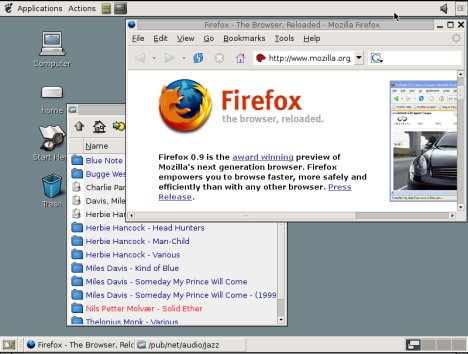
Linux gives you a graphical interface that makes it easy to use your computer, yet it still allows those with know-how to change settings by adjusting 0 to 1.
It is only the kernel that is named Linux, the rest of the OS are GNU tools. A package with the kernel and the needed tools make up a Linux distribution. Mandrake , SUSE Linux, Gentoo and Redhat are some of the many variants. GNU/Linux OS can be used on a large number of boxes, including i386+ , Alpha, PowerPC and Sparc.
Read more at LinuxReviews.org
An in-depth look at Puppy Linux
by Howard Fosdick
Puppy Linux is one of the twenty most popular Linuxes worldwide, according to the distro-tracking website Distrowatch. Puppy's distinct personality makes it of interest to those who want a Linux that...
Let's discuss Puppy's distinguishing characteristics. We'll wrap up by summarizing how it differs from other Linux distributions.
Read more at DesktopLinux.com
by Howard Fosdick
Puppy Linux is one of the twenty most popular Linuxes worldwide, according to the distro-tracking website Distrowatch. Puppy's distinct personality makes it of interest to those who want a Linux that...
- Includes all the applications required for daily use
- Works right out of the box
- Is easy to use, even for Linux newbies and Windows refugees
- Runs fast and performs well -- especially on limited hardware
- Runs on old computers, thin clients, and diskless workstations
- Installs and boots from any bootable device, including USB memory sticks, hard disks, Zip drives, LS 120/240 SuperDisks, CDs and DVDs, rewritable CDs and DVDs, and network interfaces
Let's discuss Puppy's distinguishing characteristics. We'll wrap up by summarizing how it differs from other Linux distributions.
Read more at DesktopLinux.com
Tuesday, December 23, 2008
Linux And Music
One obvious advantage of Linux is lower acquisition cost, and while this is defin itely a factor for sites with large numbers of computers and limited budgets (for example schools), it's not actually the major reason for most migrations. In the case of a multi-million dollar movie studio, it's unlikely to be the price of Linux alone that makes it attractive. These studios can afford to buy any system they want, so why are they choosing Linux? The answer is in part the lower cost of Intel processor hardware compared to the traditional SGI UNIX platform, and the fact that it's much easier to move programs from SGI to Linux than from SGI to Windows.
But a far more compelling reason for the migration is the quality and flexibility of Linux. Machines powered by Linux have been known to run for months or even years without needing a reboot, let alone crashing. In the UNIX world that's not unusual, but that kind of reliability hasn't been seen on desktop computers before. And the open source development model means that users can get the software they want, rather than just choose from what's on offer.
Another factor often cited by people who have migrated to Linux is the supportive and knowledgeable user community. If you have a problem with your Linux machine, there are lots of places to ask for help — both with local user groups and on the Internet. Linux users tend to be self-documenting: when they find the solution to a problem, they will often create a web page describing the fix to share their knowledge.
Read more at SoundOnSound
One obvious advantage of Linux is lower acquisition cost, and while this is defin
itely a factor for sites with large numbers of computers and limited budgets (for example schools), it's not actually the major reason for most migrations. In the case of a multi-million dollar movie studio, it's unlikely to be the price of Linux alone that makes it attractive. These studios can afford to buy any system they want, so why are they choosing Linux? The answer is in part the lower cost of Intel processor hardware compared to the traditional SGI UNIX platform, and the fact that it's much easier to move programs from SGI to Linux than from SGI to Windows. But a far more compelling reason for the migration is the quality and flexibility of Linux. Machines powered by Linux have been known to run for months or even years without needing a reboot, let alone crashing. In the UNIX world that's not unusual, but that kind of reliability hasn't been seen on desktop computers before. And the open source development model means that users can get the software they want, rather than just choose from what's on offer.
Another factor often cited by people who have migrated to Linux is the supportive and knowledgeable user community. If you have a problem with your Linux machine, there are lots of places to ask for help — both with local user groups and on the Internet. Linux users tend to be self-documenting: when they find the solution to a problem, they will often create a web page describing the fix to share their knowledge.
Read more at SoundOnSound
Windows 7: The Linux killer
Submitted by srlinuxx on Mon, 12/22/2008 - 00:06.http://www.tuxmachines.org
Microsoft has long been worried about Linux competition in the server market. When it came to ordinary PCs and laptops, however, it knew it had little to fear.
But that was then. Now Microsoft may fear Linux on the desktop as much as it does the Mac. It's finally taking Linux seriously as a desktop operating system, and it has designed Windows 7 to kill it.
Let me explain.
The threat to Windows comes entirely from "netbooks" -- lightweight, inexpensive laptops that typically use Intel's low-powered Atom processor and don't come with substantial amounts of RAM or powerful graphics processors. They're designed mainly for browsing the Web, handling e-mail, writing memos, and taking care of simple word-processing or spreadsheet chores.
Monday, December 22, 2008

GNU/Linux on old hardware
Saturday, 13 August 2005, michuk
Is Linux a good choice for your old PC? In this article I’m going to examine the main issues connected with using GNU/Linux on some very old hardware. I will also cover choosing a distro, a desktop and the key applications for such a configuration.
Author: Borys Musielak
What are the minimal hardware requirements for Linux?
In theory, a computer with 386 processor and some 8MB of RAM is good enough to run GNU/Linux. There are a few specialized distros (still supported!) that allow you to install Linux on such a PC. Of course you won’t be able to run most of the modern apps on such a system, but it should be enough to do simple office tasks and play some old-school games.
If you have a Pentium I with some 32/64MB RAM, you can, with just a little bit of effort, make an outstanding desktop computer out of it, running GNU/Linux of course. You will still need a special distro for that, though.
However, if you get a Pentium II 455Mhz with a 10GB hard drive (it can be purchased for less than $50 nowadays), you can install any modern GNU/Linux distribution on it and with thoughtful selection of applications, it can make a great home Internet and multimedia center for next couple of years.
Read more at polishlinux.org
Linux distros for older hardware
By Joe 'Zonker' Brockmeier on February 24, 2006 (8:00:00 AM)
Microsoft lately has been challenging Linux's suitability for older hardware, so it seems like a good time to look at Linux distributions that can run on older machines. I took six distributions for a test run on an old machine, and also tried software that turns old hardware into a thin client. The bottom line: Linux is still quite suitable for older hardware. It might not turn your aging PC into a powerhouse, but it will extend its lifespan considerably.
For these tests, I dug out Igor, an old PC that had been collecting dust in my closet. Igor is a Pentium II 233MHz machine with 64MB of RAM, an 8x CD-ROM drive, a 3GB hard drive, and an integrated ATI 3D Rage Pro video card with 4MB of video RAM. You can run Linux on older and slower machines, but this is the most under-powered machine I had available.
Read more at Linux.com
How low can you go and still run Linux?
 Opinion -- I remember when getting a decent PC would set you back at least a grand. Then it was $500. Now, it's $150!? That's the story that small vendor LinFX wants you to buy along with its PC with pre-installed Linux.
How does LinFX manage to sell a fully operational computer with a 15-inch display for $150? Well, while the Linux distribution, PCLinuxOS 2007, is a state-of-the-art 21st century desktop Linux, the hardware, an IBM NetVista desktop with a 900MHz Intel Pentium III and 256MB of RAM, is right out of the year 2000.
Back in its day, this system ran either Windows ME or Windows 2000. Today, if you're a Windows user, it's a doorstop. For a Linux user, though, this refugee from the junkyard is actually still a useful computer.
Read more at DesktopLinux.com
Opinion -- I remember when getting a decent PC would set you back at least a grand. Then it was $500. Now, it's $150!? That's the story that small vendor LinFX wants you to buy along with its PC with pre-installed Linux.How does LinFX manage to sell a fully operational computer with a 15-inch display for $150? Well, while the Linux distribution, PCLinuxOS 2007, is a state-of-the-art 21st century desktop Linux, the hardware, an IBM NetVista desktop with a 900MHz Intel Pentium III and 256MB of RAM, is right out of the year 2000.
Back in its day, this system ran either Windows ME or Windows 2000. Today, if you're a Windows user, it's a doorstop. For a Linux user, though, this refugee from the junkyard is actually still a useful computer.
Read more at DesktopLinux.com
Subscribe to:
Posts (Atom)